2025-12-06
09:28:16, atom feed.
Here's the curated commit log for last week.
2025-12-03
fix: allow player to change facing direction even if they can't move

2025-12-03
refactor: wrap platform-side details (renderer, screen dims) in struct

2025-12-03
feat: use renderer logical presentation to support arbitrary upscaling

This also removes explicit transformation from world tiles to world
pixels as world pixels were only ever used as an intermediate frame when
transforming to screen pixels.

2025-12-04
docs: add concept groundwork for first game; separate next game content

2025-12-04
feat: add first enemy, random movement; add entity-entity collision

2025-12-05
fix: round lowest visible tile idx toward 0 to fix gap in map_render
I split my time three ways this week, one by necessity and another mostly by chance. As this post is about solo game dev, I will share details peripheral to development from time to time as they are part of the journey. In this case, the by-necessity thing was applying for health insurance as it is mandatory to have if living in Japan. I'll split that into another short post, though.
The second thing was game design. While I will go into detail about the mechanics and perhaps level design, I will probably never go into much detail about the story itself, as I'd like to leave that up to players to experience and interpret. I guess I can elaborate a bit on my trajectory until recently, though. I plan on this being my first game I'll publish and sell. I'd love for it to be "successful," but I don't bank on that at all, pun intended. What I want to do is get experience going end-to-end, from an empty file in a text editor to a game in the market. That will be quite a journey, but that will be the first iteration. From there I'll learn whatever I can and repeat. Toward that, I don't want to develop slop, will try to come up with something creative and worthwhile for me and others.
At first I had an idea to clone an existing, small game I enjoyed and add some extensions. This gave me well-scoped goals and removed a big task, which was novel game design. This was all toward getting some iteration out in public quickly. Lots of the big indie game hits took 5+ years to develop. I'd like to get something out in 1 or 2 years, again, without the aspiration that my title would mean anything to anyone but me. To date, I've been developing my own game for something to the tune of 7 weeks or so, and already, my own game design ideas are popping up in my mind. I did rack my brain for the first two weeks for some interesting, novel idea I could build a game around, but nothing really surfaced. I recalled a talk I watched from Jon Blow, I think it was his keynote at GDC 2014, where he was discussing where to find inspiration for interesting games. I've also learned from my beloved Kojima Hideo-san and also Sakurai Masahiro-san. The thing I always walked away with, though, is that I'm not going to sit and try to come up with an idea that makes for an interesting story or game. And indeed, this has proven true in my life. Perhaps ironically, it is by not trying that I have had my most promising ideas for games. This time around has been no different. As I develop and think about which feature to try and implement next, ideas seem to naturally bubble up into my mind. "Ah, what if instead of the game working in this way, it works in that way?" And "that" way turns out to have some parallel with a transformative experience I had in life, and suddenly a game feature becomes a metaphor for a realization I had or a way of thinking that changed my life. And then a game feature and a story element naturally weave themselves together. I'm being vague here still so as to not spoil anything about the story I'm thinking of writing, but I think I've described the gist.
Paraphrasing the Tao Te Ching, by not doing, it is done.
I also read and listened to talks about creating game design documents. Creating one before doing any other work probably works well for the niche of people that are borderline clairvoyants, but they don't work like that for me. In fact, they smell like the stereotypical project manager who tries to outline a product on paper and get it right the first time. Of course, the game design document is a living document in either case, so it does evolve over time, typically to be come less prescriptive and more descriptive. For me, the way it works is that I develop something, seem to naturally get interesting ideas over time related to my life experiences, and then I just jot the ideas down in a Markdown file checked in at the root of my game's repo. It's less a design document and more a journal of the concepts at play in the game and ideas I've had that I want to explore further. Once I have such ideas, these are seeds from which I can sit and intentionally think more deeply about and further develop. Going from 0 to 1 idea-wise, I have no process for. I often just need to let my mind wander (/wonder). Once I have 1, I can play with that intentionally and grow it in this and that way.
One guiding principle of my game design is that I want to respect the player's time. What I mean by this is try to share an interesting mechanic, idea, or thought with the player in 3-5 hours. The game would need to be priced accordingly, but otherwise, I don't like the thought of me creating something that, if a hit, consumes 80+ hours of tens of thousands if not millions of people's time just distracting them from something else in life.
Finally, the third thing was typical feature development. The most interesting topics this week are rendering logical presentation and adding the first test enemy.
Regarding logical presentation, after creating a 16x16 px sprite and then
rendering it in my game, I thought the sprite was a bit too small on my monitor.
I had two choices. The first was redraw the sprite, and eventually every asset,
at a larger resolution. The second was to upscale the sprite. The first would
cause the art to take more time, and the second seemed more practical, so I
tried to do the second. When I did that, I got some strange effects. There
seemed to be some sort of visual tearing between tiles. What was in fact
happening was that SDL was applying blending upon upscaling. This is controlled
per-texture using
SDL_SetTextureScaleMode.
SDL3 conveniently provides SDL_SCALEMODE_PIXELART as a scale mode, perfect
for my use cases.
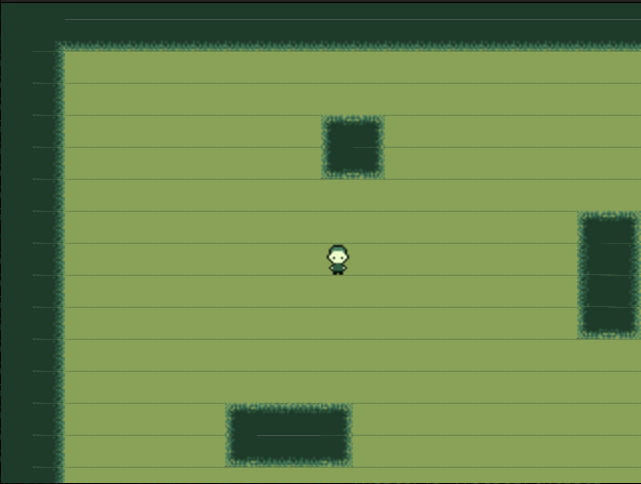
Here is what rendering looked like before applying.
Here is what it looked like after.
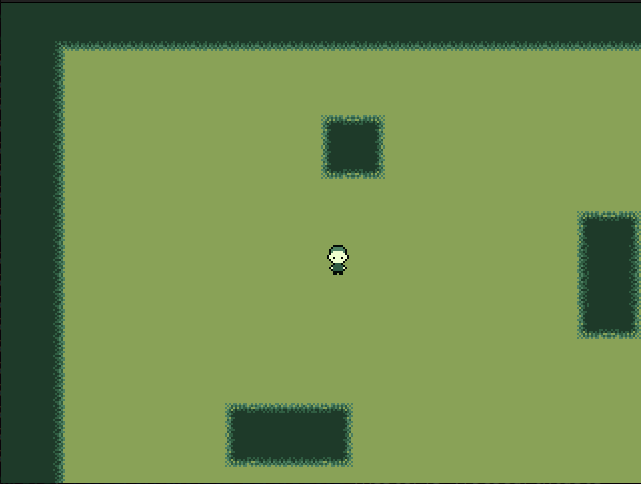
You can see the "tearing" issue is fixed. The pixelart version is much sharper, although there is a nice CRT-like aesthetic to the previous scale mode, which I think was just nearest-neighbor. I'm going to keep the pixelart scale mode for a variety of reasons. I won't get into that more this time, though.
You may also have noticed that the image of the game seems zoomed in compared to images or videos in previous posts. At first, I was scaling the rendering by adding an explicit scale factor (2x) and then propagating that scale factor to all code that dealt with transforming to or working in screen pixel space. One question that naturally comes up is, how do I render to a screen space that has an aspect ratio different than my world map? If I create a scale factor based on the latest window dimensions, I will need a horizontal and vertical scale factor. Or, I could create a uniform scale factor, but what do I do when my scaling doesn't fill the entire screen in some dimension? I'd generally accommodate this manually. One would typically fill the gap with letterboxes. (Grokipedia isn't so great at the time of this writing in that it doesn't show images, and an image would explain this concept immediately. Anyway, here's to hoping the article is better in the future.)
I found that SDL has a function to handle this for me, called
SDL_SetRenderLogicalPresentation.
So I employed that function. The gist is that you have some actual screen
dimensions that the rendered image is displayed in, but you can configure a
logical render space that you will target your code/math to. SDL will handle
scaling your logical render space to the physical render space at presentation
time. So, you don't have to worry about handling letterboxing or uniform
scaling anymore. To boot, you also don't have to propagate manual scaling
factors throughout your code. Instead, I just propagate the logical render
dimensions. When I want to scale up, I configure the logical render dimensions
to be smaller than the physical render dimensions.
The second notable feature was adding my first test enemy. I hacked the enemy
directly into the game state object for now, but I realized I'll have to do
some thinking on how to efficiently manage multiple enemies (generalized to
entities) for some level or game state. Problems include: reusing an entity
asset across multiple entities instead of each entity owning its own
(potentially duplicate) asset, creating a statically-sized collection for
entities and marking some as existent/non-existent or having the collection
by dynamically-sized (so non-existence is handled via delete or remove
or something like that on the collection), and how to store information about
how many entities and their kinds to spawn and where for each level.
Then I also need to implement pathfinding for enemies.
Currently I have a simple ghost-like sprite spawned at a hard-coded location that maybe moves in some random direction when the player moves. As the game is tile-based, collision detection is simply
- check for collision on the map
- check for collision with other entity