This post is the explanation of efficient tilemap rendering using SDL GPU that I wish I had when I set out to build a tilemap renderer. In this post, I write CPU-side code in Jai using SDL3 bindings I generated, and I write shader code in HLSL.
SDL GPU and HLSL
SDL GPU allows you build a graphics pipeline with a configuration granularity similar to that of Vulkan. SDL shadercross allows you to write shaders in HLSL or something that compiles to SPIR-V and then transpiles your shader code to Vulkan, DirectX Intermediate Language, or Metal Shading Language. In this way, you can build modern graphics pipelines by writing a shader program once that you can then leverage on the three main desktop runtimes. You'll probably write more than one shader program, but you don't have to write one per platform, just one per desired rendering behavior.
At the time of this writing, the official way to learn both SDL GPU and HLSL seems to be by studying examples. This appears to be the defacto official set of SDL GPU examples at the time of this writing. I found the official HLSL learning material from Microsoft to be more like a reference than a guide. Perhaps the most effective way to learn HLSL is also by looking at examples, from simple triangle renderers, building up to texture samplers, etc. The SDL GPU examples provide some source you can reference.
Outline
Before we see any code, let's walk through what we're about to do. On the CPU side, we have a texture atlas and we have a list of tiles visible on the frame we want to render something. We need to get both of these things to the GPU. We assume the texture atlas holds all tiles necessary to render a complete map (for example, the current level), so we only need to transfer the texture data to the GPU once, until we want to change it (for example, to load a different level). We assume the list of tiles visible for a single frame changes across frames, so we need to transfer this data to the GPU every frame. While I will show how to do this, for simplicity's sake, we will actually transfer the entire tilemap each frame and rely on the renderer to frustum-cull things we cannot see.
We also need to transfer some supporting information to the GPU, such as metadata about our texture atlas and also transformation matrices to map world coordinates to screen coordinates. Not all of this data has to be transferred each frame, but again for simplicity, we will bundle it together and transfer it every frame.
We of course need a graphics pipeline to render everything as well. That involves a lot of one-time setup and then some per-frame calls to transfer the data I mentioned above.
This diagram shows the main SDL GPU things we will create at initialization time (before the game loop) and then the main things we will do in the game loop. It's not a complete picture, but maybe it helps keep the general idea in mind.
┌─────────────────┐
│┌────────────────┴┐      ┌─────────────┐      ┌─────────────────────┐
└┤ shader sources  ├─────►│ shadercross ├─────►│ precompiled shaders │
 └─────────────────┘      └─────────────┘      └─────────┬───────────┘
                                                         │
┌──────────────────────────────────┐                     │
│ main program                     │  ┌──────────────────┘
│                                  │  │
│ ┌────────────────┐               │  │  ┌──────────────────────────┐
│ │ initialization │◄──────────────┼──┘  │ GPU                      │
│ └─┬──────────────┘               │     │                          │
│   │creates                       │     │                          │
│   ├──────────────────────────────┼─────┼─► pipeline               │
│   ├──────────────────────────────┼─────┼─► visible tile buffer    │
│   ├► visible tile transfer buffer│     │                          │
│   ├──────────────────────────────┼─────┼─► texture                │
│   ├► texture transfer buffer     │     │                          │
│   └► sampler                     │     └──────────────────────────┘
│ ┌────────────────┐               │
│ │ game loop      │               │
│ └─┬──────────────┘               │
│   ├► upload visible tiles        │
│   ├► upload uniforms             │
│   ├► bind visible tile buffer    │
│   ├► bind texture and sampler    │
│   └► draw GPU primitives         │
└──────────────────────────────────┘
Loading Shaders
When building a graphics pipeline later on, we'll need to provide precompiled
shader programs that instruct the different rendering stages how to process the
tile vertices and the texture atlas. Below is a translation of the popular
defacto official SDL GPU example repo's common LoadShader.
Note that we have to specify the numbers of different kinds of inputs at the shader interface. SDL does not do any shader reflection to determine this. More on this later.
load_shader :: (
  device: *SDL_GPUDevice,
  filename: string,
  sampler_count: u32,
  uniform_buffer_count: u32,
  storage_buffer_count: u32,
  storage_texture_count: u32
) -> *SDL_GPUShader {
  // Auto-detect shader stage from the filename.
  stage: SDL_GPUShaderStage;
  if String.contains(filename, ".vert") {
    stage = .VERTEX;
  } else if String.contains(filename, ".frag") {
    stage = .FRAGMENT;
  } else {
    log_error("Cannot determine shader stage from shader filename");
    return null;
  }

  // Determine full filename and shader format based on dynamically-detected
  // supported backends.
  supported_formats := SDL_GetGPUShaderFormats(device);
  our_format := SDL_GPU_SHADERFORMAT_INVALID;
  full_path: string;
  entrypoint: *u8;

  if supported_formats & SDL_GPU_SHADERFORMAT_SPIRV {
    full_path = tprint("%.spv", filename);
    our_format = SDL_GPU_SHADERFORMAT_SPIRV;
    entrypoint = "main";
  } else if supported_formats & SDL_GPU_SHADERFORMAT_MSL {
    full_path = tprint("%.msl", filename);
    our_format = SDL_GPU_SHADERFORMAT_MSL;
    entrypoint = "main0";
  } else if supported_formats & SDL_GPU_SHADERFORMAT_DXIL {
    full_path = tprint("%.dxil", filename);
    our_format = SDL_GPU_SHADERFORMAT_DXIL;
    entrypoint = "main";
  } else {
    log_error("Platform does not support any of our shader formats.");
    return null;
  }

  code_size: u64;
  code := SDL_LoadFile(temp_c_string(full_path), *code_size);
  if code == null {
    log_error("Failed to load file '%'.", full_path);
    return null;
  }
  defer SDL_free(code);

  shader_create_info := SDL_GPUShaderCreateInfo.{
    code = code,
    code_size = code_size,
    entrypoint = entrypoint,
    format = cast(u32)our_format,
    stage = stage,
    num_samplers = sampler_count,
    num_uniform_buffers = uniform_buffer_count,
    num_storage_buffers = storage_buffer_count,
    num_storage_textures = storage_texture_count
  };
  shader := SDL_CreateGPUShader(device, *shader_create_info);
  if shader == null {
    log_error("Failed to create shader: %", to_string(SDL_GetError()));
  }

  return shader;
}
Initialization
First, we will create a window, a "GPU device," and configure frame pacing. Note that we have a physical (actual window) size and a logical (render destination) size. We render to a window of some physical size but act like it's a window of some logical size, allowing us to upscale our art.
Cleanup/deinitialization code is not shown.
#import "SDL3";
Math :: #import "Math";
stbi :: #import "stb_image";

LOGICAL_WIDTH_PX   :: 320;
LOGICAL_HEIGHT_PX  :: 180;
RENDER_SCALE       :: 4;
PHYSICAL_WIDTH_PX  :: LOGICAL_WIDTH_PX * RENDER_SCALE;
PHYSICAL_HEIGHT_PX :: LOGICAL_HEIGHT_PX * RENDER_SCALE;
TILE_SIZE_PX       :: 16;
MAX_VISIBLE_TILES  :: 4096;

assert_sdl_ok :: inline (ok: bool) {
  if !ok {
    log_error("SDL3 error: %\n", to_string(SDL_GetError()));
    exit(1);
  }
}

main :: () {
  ok := SDL_Init(SDL_INIT_VIDEO);
  assert_sdl_ok(ok);

  window := SDL_CreateWindow("game_name", PHYSICAL_WIDTH_PX, PHYSICAL_HEIGHT_PX, 0);
  assert_sdl_ok(window != null);

  supported_formats := SDL_GPU_SHADERFORMAT_SPIRV |
                       SDL_GPU_SHADERFORMAT_DXIL  |
                       SDL_GPU_SHADERFORMAT_MSL;
  device := SDL_CreateGPUDevice(supported_formats, true, null);
  assert_sdl_ok(device != null);

  ok = SDL_ClaimWindowForGPUDevice(device, window);
  assert_sdl_ok(ok);

  // sdlwiki's SDL3/SDL_GPUPresentMode.html says that VSYNC is always available.
  // We don't need the fidelity of MAILBOX, and all bets are off regarding frame
  // pacing with IMMEDIATE, so we use VSYNC in this example.
  present_mode := SDL_GPUPresentMode.VSYNC;
  ok = SDL_SetGPUSwapchainParameters(
    device, window, SDL_GPUSwapchainComposition.SDR, present_mode);
  assert_sdl_ok(ok);

  // `main` is continued further down this post.
It's important we don't create a dedicated renderer for the window like we would if we were using the basic SDL rendering interface since we delegate rendering responsibility to the GPU device by claiming the window.
Tilemap Renderer
In this context, the tilemap renderer is a collection of a graphics pipeline that we will construct and handles to the buffer we will use to pass visible tile data from the CPU to the GPU. We won't actually use the buffer just yet, so I will explain the handles later.
We introduce a Tile struct which holds the information for a visible tile
that we want to pass from the CPU to GPU. The struct has padding to satisfy
16-byte alignment which is a restriction
imposed by the shader side. We want our CPU-side struct memory layout to match
our shader-side struct memory layout exactly so we can do simple memory copies
from the CPU to the GPU.
Tile :: struct {
  screen_position_px: Math.Vector2;
  tile_id: u32;
  padding: u32;
}
Place the Tile struct definition wherever you'd like. The following code
goes in main, after the code shown in the section above. This code references
precompiled shaders by pathname. I'll cover how to generate the precompiled
shaders behind these pathnames later.
Note that in the graphics pipeline create info, our primitive type is a triangle strip, not a triangle list. This is because we're drawing a tilemap, where we assume visible tiles are contiguous either vertically or horizontally.
// Load our shaders.
vertex_shader := load_shader(device, "tilemap.vert", 0, 1, 1, 0);
if vertex_shader == null { return false, .{}; }
defer SDL_ReleaseGPUShader(device, vertex_shader);

fragment_shader := load_shader(device, "tile.frag", 1, 0, 0, 0);
if fragment_shader == null { return false, .{}; }
defer SDL_ReleaseGPUShader(device, fragment_shader);

// Build the graphics pipeline.
blend_state := SDL_GPUColorTargetBlendState.{
  enable_blend = true,
  color_blend_op = .ADD,
  alpha_blend_op = .ADD,
  src_color_blendfactor = .SRC_ALPHA,
  dst_color_blendfactor = .ONE_MINUS_SRC_ALPHA,
  src_alpha_blendfactor = .SRC_ALPHA,
  dst_alpha_blendfactor = .ONE_MINUS_SRC_ALPHA
};

color_target_descriptions := SDL_GPUColorTargetDescription.[
  {
    format = SDL_GetGPUSwapchainTextureFormat(device, window),
    blend_state = blend_state
  }
];

target_info := SDL_GPUGraphicsPipelineTargetInfo.{
  num_color_targets = 1,
  color_target_descriptions = color_target_descriptions.data
};

graphics_pipeline_create_info := SDL_GPUGraphicsPipelineCreateInfo.{
  vertex_shader = vertex_shader,
  fragment_shader = fragment_shader,
  primitive_type = .TRIANGLESTRIP,
  target_info = target_info
};

pipeline := SDL_CreateGPUGraphicsPipeline(device, *graphics_pipeline_create_info);
assert_sdl_ok(pipeline != null);

// Create the buffer we'll use to transfer visible tiles to the GPU.
visible_tile_buffer_size := cast(u32)(size_of(Tile) * MAX_VISIBLE_TILES);
buffer_create_info := SDL_GPUBufferCreateInfo.{
  usage = SDL_GPU_BUFFERUSAGE_GRAPHICS_STORAGE_READ,
  size = visible_tile_buffer_size
};
visible_tile_buffer := SDL_CreateGPUBuffer(device, *buffer_create_info);

visible_tile_transfer_buffer_create_info := SDL_GPUTransferBufferCreateInfo.{
  usage = .UPLOAD,
  size = visible_tile_buffer_size
};
visible_tile_transfer_buffer := SDL_CreateGPUTransferBuffer(
  device, *visible_tile_transfer_buffer_create_info
);
We will be using pipeline, visible_tile_buffer, and
visible_tile_transfer_buffer later, in our game loop.
Uploading the Texture Atlas
In this post, we will use a simple atlas containing 6 unique tiles (3 x 2). Each tile is 16 x 16 pixels with no padding in between and is some unique, solid color. The image is provided below for reference.

First, we load the image from disk and store the raw pixel data as a byte array. Then, we need to transfer these bytes to the GPU. Transferring this data to the GPU is done in two steps. The first is to have the CPU write the data into staging memory that both the CPU and GPU have read/write access to, and the second is to instruct the GPU's DMA engine to copy said data out of the staging memory into VRAM. The transfer buffer concept that we saw above corresponds to staging memory, and once the GPU copies data into VRAM, we will also receive a handle to the GPU texture that we will use later.
When we ask the GPU to copy data, it does not copy it immediately. Instead, we queue up an arbitrary number of commands into what is called a command buffer. One such command is starting a copy pass. After starting a copy pass, we enqueue additional commands to perform the data transfer. We then end the copy pass, and then we submit the command queue to the GPU, and the GPU executes the instructions as it sees fit (for example, perhaps with some instruction optimization done by the underlying driver).
When dealing with textures, we will also need to create a sampler, which instructs shader programs how to read pixel data out of textures we provide. We create a sampler here and will use it later.
// Load our image.
bytes_per_pixel :: 4;
image_width, image_height, num_channels, channels_hint: s32;
image_bytes: []u8;
image_bytes.data = stbi.stbi_load(
  "test_atlas.png", *image_width, *image_height, *num_channels, channels_hint);
if image_bytes.data == null {
  log_error("Failed to load image for texture atlas.");
  exit(1);
}
if (image_width % TILE_SIZE_PX > 0) || (image_height % TILE_SIZE_PX > 0) {
  log_error("Tile size does not divide the texture atlas image evenly.");
  exit(1);
}
if num_channels != 4 {
  // Require a 4-channel image for easy buffer sizing in this example.
  log_error("Number of channels in texture atlas image is not 4.");
  exit(1);
}
image_bytes.count = image_width * image_height * bytes_per_pixel;

// Create staging memory.
texture_transfer_buffer_create_info := SDL_GPUTransferBufferCreateInfo.{
  usage = .UPLOAD,
  size = cast(u32)image_bytes.count
};
texture_transfer_buffer := SDL_CreateGPUTransferBuffer(
  device, *texture_transfer_buffer_create_info);

// Get a pointer to staging memory that we can memcpy to.
texture_transfer_pointer := SDL_MapGPUTransferBuffer(
  device, texture_transfer_buffer, false);
SDL_memcpy(
  texture_transfer_pointer, image_bytes.data, cast(u64)image_bytes.count);
SDL_UnmapGPUTransferBuffer(device, texture_transfer_buffer);

// Instruct the GPU to allocate the necessary space in VRAM for our texture.
texture_create_info := SDL_GPUTextureCreateInfo.{
  type = ._2D,
  format = .R8G8B8A8_UNORM,
  width = cast(u32)image_width,
  height = cast(u32)image_height,
  layer_count_or_depth = 1,
  num_levels = 1,
  usage = SDL_GPU_TEXTUREUSAGE_SAMPLER
};
texture := SDL_CreateGPUTexture(device, *texture_create_info);

// Build a command queue instructing the GPU to copy texture data from staging
// memory into VRAM.
upload_cmd := SDL_AcquireGPUCommandBuffer(device);
upload_copy_pass := SDL_BeginGPUCopyPass(upload_cmd);

transfer_info := SDL_GPUTextureTransferInfo.{
  transfer_buffer = texture_transfer_buffer,
  offset = 0,
};
region := SDL_GPUTextureRegion.{
  texture = texture,
  mip_level = 0,
  layer = 0,
  x = 0, y = 0, z = 0,
  w = cast(u32)image_width,
  h = cast(u32)image_height,
  d = 1
};
SDL_UploadToGPUTexture(upload_copy_pass, *transfer_info, *region, false);

SDL_EndGPUCopyPass(upload_copy_pass);
SDL_SubmitGPUCommandBuffer(upload_cmd);

SDL_ReleaseGPUTransferBuffer(device, texture_transfer_buffer);

sampler_create_info := SDL_GPUSamplerCreateInfo.{
  min_filter = .NEAREST,
  mag_filter = .NEAREST,
  mipmap_mode = .NEAREST,
  address_mode_u = .CLAMP_TO_EDGE,
  address_mode_v = .CLAMP_TO_EDGE,
  address_mode_w = .CLAMP_TO_EDGE
};
sampler := SDL_CreateGPUSampler(device, *sampler_create_info);
In this example, we don't plan on reloading the tile atlas, so from this section
of code, we will only be using the image metadata, texture, and sampler
later on.
Debug Map
We have a tile atlas for our "level," but we don't yet have the actual level's
map. We'll create a simple map as follows. First, this code goes outside of
main.
Map :: struct {
  width_tiles: s64;
  height_tiles: s64;
  tiles: [] s16;
}

create_debug_map :: () -> Map {
  map: Map;
  map.width_tiles = 10;
  map.height_tiles = 10;
  map.tiles = NewArray(map.width_tiles * map.height_tiles, s16);

  // Tile IDs (indices into the atlas) for various colors.
  background_tile_index :: 2;
  border_tile_index :: 1;
  upper_border_tile_index :: 0;
  left_border_tile_index :: 5;

  for map.tiles { map.tiles[it_index] = background_tile_index; }

  for row: 0..map.height_tiles - 1 {
    for col: 0..map.width_tiles - 1 {
      if row == 0 {
        map.tiles[col] = upper_border_tile_index;
      } else if row == map.height_tiles - 1 {
        map.tiles[row * map.width_tiles + col] = border_tile_index;
      } else if col == 0 {
        map.tiles[row * map.width_tiles] = left_border_tile_index;
      } else if col == map.width_tiles - 1 {
        map.tiles[row * map.width_tiles + col] = border_tile_index;
      }
    }
  }

  return map;
}
Back in main, we then have the following.
map := create_debug_map();
Uploading Visible Tile Data
We are now operating inside the game loop. On each frame, we will pass the visible tile data from the CPU to the GPU for use in our shaders. We do this using a pattern we've already seen: getting a handle on staging memory by way of a transfer buffer handle.
For brevity, SDL event handling is not shown, although its absence does not affect rendering.
As mentioned earlier, we treat the entire map as being visible and rely on frustum culling to not draw invisible parts of the map. You could refine the logic below to determine tiles that are actually visible as an optimization if your map is large.
run := true;
while run {
  // Fill staging memory with visible tile information.
  mapped_tiles := cast(*Tile)SDL_MapGPUTransferBuffer(
    device, visible_tile_transfer_buffer, true);
  for y: 0..map.height_tiles - 1 {
    for x: 0..map.width_tiles - 1 {
      map_index := y * map.width_tiles + x;
      id := map.tiles[map_index];
      mapped_tiles[map_index] = .{
        screen_position_px = .{
          cast(float32)(x * tilemap_renderer.tile_size_px),
          cast(float32)(y * tilemap_renderer.tile_size_px)
        },
        tile_id = cast(u32)id
      };
    }
  }
  SDL_UnmapGPUTransferBuffer(device, visible_tile_transfer_buffer);

  // Request the GPU to copy visible tile information to VRAM.
  command_buffer := SDL_AcquireGPUCommandBuffer(device);
  copy_pass := SDL_BeginGPUCopyPass(command_buffer);

  transfer_size := cast(u32)(map.tiles.count * size_of(Tile));
  copy_source := SDL_GPUTransferBufferLocation.{
    transfer_buffer = visible_tile_transfer_buffer,
    offset = 0
  };
  copy_destination := SDL_GPUBufferRegion.{
    buffer = visible_tile_buffer,
    offset = 0,
    size = transfer_size
  };
  SDL_UploadToGPUBuffer(copy_pass, *copy_source, *copy_destination, true);

  SDL_EndGPUCopyPass(copy_pass);

  // Game loop code continued below.
Notice that we have acquired a command buffer but that we haven't submitted it yet. We are through specifying commands for the copy pass, but next, in the same command buffer, we will specify commands for a render pass as well.
Draw Commands
It's time to start drawing. When drawing, we ask for a swapchain texture from the underlying graphics driver. The texture is what we draw to, and if, for example, the graphics driver uses double-buffering and the back buffer is available, that is the swapchain texture we will get a handle to. It is possible that no buffer is available, in which case we simply don't submit drawing commands on this frame.
To submit drawing commands, we need to begin a render pass.
Next, we need to provide the texture atlas metadata alluded to earlier and also
matrices required for coordinate transformations. We bundle all of this data
together into an instance of TilemapUniforms. Define this struct somewhere
outside of the game loop.
TilemapUniforms :: struct {
  view_matrix: Math.Matrix4;
  projection_matrix: Math.Matrix4;
  atlas_tile_size_px: Math.Vector2; // Uniform side length of a single tile.
  atlas_size_texels: Math.Vector2;  // (w, h) of the entire atlas.
  atlas_tiles_per_row: u32;
}
We also have a camera, which is simply:
Camera :: struct {
  pos: Math.Vector2; // (x, y) world position in pixels.
}
and then before the game loop:
camera: Camera;
Back in the game loop, we prepare the various transformation matrices. We draw
whatever the camera is looking at (which we say is the camera's position, for
simplicity) in the middle of the screen. Note that we do not use a transfer
buffer or copy pass when pushing the uniforms to the GPU. SDL maintains a small
buffer for this purpose for us as a convenience. While generic buffer data can
potentially be roughly as large as you have VRAM, uniform data is much smaller,
often on the maximum order of kilobytes.
Finally, note that when we draw GPU primitives,
we use 4 vertices per quad because we are in triangle strip mode.
  // Bind required resources and then draw.
  swapchain_texture: *SDL3.SDL_GPUTexture;
  if SDL_WaitAndAcquireGPUSwapchainTexture(
    command_buffer, window, *swapchain_texture, null, null) {
    color_target := SDL_GPUColorTargetInfo.{
      texture = swapchain_texture,
      clear_color = .{ 0.1, 0.1, 0.15, 1.0 },
      load_op = .CLEAR,
      store_op = .STORE
    };
    render_pass := SDL_BeginGPURenderPass(command_buffer, *color_target, 1, null);

    view_matrix := Math.make_translation_matrix4(.{
      -1 * camera.pos.x + LOGICAL_WIDTH_PX / 2,
      -1 * camera.pos.y + LOGICAL_HEIGHT_PX / 2,
      0.0
    });
    Math.transpose(*view_matrix); // Jai uses row-major, HLSL uses column-major.
    projection_matrix := Math.orthographic_projection_matrix(
      0, LOGICAL_WIDTH_PX, LOGICAL_HEIGHT_PX, 0, -1.0, 1.0, depth_range_01 = true);
    Math.transpose(*projection_matrix);

    // Submit render commands.
    SDL_BindGPUGraphicsPipeline(render_pass, pipeline);

    // Push uniform data. Slot 0 corresponds to space1 in the vertex shader.
    uniforms := TilemapUniforms.{
      view_matrix = view_matrix,
      projection_matrix = projection_matrix,
      atlas_tile_size_px = .{TILE_SIZE_PX, TILE_SIZE_PX},
      atlas_size_texels = .{image_width, image_height},
      atlas_tiles_per_row = cast(u32)(image_width / TILE_SIZE_PX)
    };
    SDL_PushGPUVertexUniformData(command_buffer, 0, *uniforms, size_of(TilemapUniforms));

    // Bind the storage buffer. Slot 0 corresponds to space0 in the vertex shader.
    SDL_BindGPUVertexStorageBuffers(render_pass, 0, *visible_tile_buffer, 1);

    // Bind the atlas texture and the sampler together. Slot 0 maps to space2
    // in the fragment shader.
    sampler_binding := SDL_GPUTextureSamplerBinding.{
      texture = texture,
      sampler = sampler
    };
    SDL_BindGPUFragmentSamplers(render_pass, 0, *sampler_binding, 1);

    SDL_DrawGPUPrimitives(render_pass, 4, map.tiles.count, 0, 0);
    SDL3.SDL_EndGPURenderPass(render_pass);
  }

  // Game loop code continued below.
Drawing
Finally, to actually draw something on the screen, we need to submit the command buffer that contains both our instructions to transfer data and also our draw commands.
  SDL3.SDL_SubmitGPUCommandBuffer(command_buffer);
} // End of game loop
Aside
Before we move on to the shader source, two words about the above.
First, it's a lot of code, and the way I've laid it out here is quite messy. However, as we see, we have two general sections of code: initialization and rendering. We can wrap a fair amount of this code into a few functions and stuff the implementation into another module to clean things up and make the routines more reusable. This will help you reuse your existing pipeline if you want to load new level tile data. This will also help you when you want to render individual sprites, such as for players or items or whatnot. In this case, you will want a different set of shaders and thus will need a different pipeline. It is fine to build a second pipeline and then, when rendering, upload data to your first pipeline and issue draw commands, and then in the same command buffer, bind your second pipeline, upload data to it, and then issue draw commands.
Second, instead of providing (x, y) atlas coordinates, we could chop the atlas up into discrete tiles and build a 2D texture array on the GPU. Then, we could work directly with the atlas tile ID instead of transforming to x and y texel coordinates as you will see soon. This is a bit more work but will solve pixel bleeding without requiring any tricks in shader code. Later on, we'll see such a trick to address bleeding when using a single tile atlas.
Compiling Shaders
When using shadercross, we write shaders in either HLSL or something that compiles to SPIR-V. I'm writing this example on a macBook, so when it comes time for me to compile to MSL, the invocation looks like this:
shadercross tilemap.vert.hlsl -o tilemap.vert.msl
(I say "compile," but going to MSL is more like a transpile, as MSL is a
human-readable dialect of C++14 that is also still usable in our context.
shadercross will not emit .metallib, the actual bytecode format, as that
requires proprietary Apple tooling.)
This is the same tilemap.vert shown in the shader-loading code earlier in
this post. The full filename has a platform-specific extension on it, and we
assume that before calling load_shader that you have compiled the shader
source to the necessary runtime target format.
Vertex Shader
Here is the vertex shader source. Notice that the layouts of struct Tile and
cbuffer UniformBuffer are the same, byte-wise, as the corresponding types in
our CPU-side code.
StructuredBuffer is an indexable, read-only collection of potentially large
data. Think of it as an array. t0 is the 0th register of the Shader Resource
View. Shader Resource View is a descriptor, and a descriptor is essentially a
pointer table with supporting metadata. The pointer table points to where data
actually lives in VRAM, and the metadata describes how to interpret the bytes
pointed to. cbuffer is the constant buffer, a special region of GPU memory
tailored for fast, uniform reads across many parallel GPU threads.
Note that we use space1 for the uniorm buffer. This is a requirement
imposed by SDL GPU on us so that SDL GPU can maintain a rigid mapping to its
various backends (MSL, Vulkan, etc.). See
SDL_CreateGPUShader docs
for details.
main automatically receives an instance and vertex ID by way of the
system-value semantic annotations in VertexInput. The instance ID is the ID
of the tile in the visible tile data we sent over from the CPU. The vertex ID
is somewhere between (inclusive) the 4 corners of a quad, outlined in our
quad_offsets.
The small trick to prevent pixel bleeding is the computation and addition
of inset which pulls interpolated texture coordinates away from the texture
edges.
struct Tile {
  float2 screen_position_px; // Top-left.
  uint tile_id;              // Tile ID in a tile atlas.
  uint padding;              // 4-byte padding to maintain 16-byte alignment.
};

StructuredBuffer<Tile> visible_tiles : register(t0, space0);

cbuffer UniformBuffer : register(b0, space1) {
  float4x4 view_matrix;
  float4x4 projection_matrix;
  float2   atlas_tile_size_px;
  float2   atlas_size_texels;
  uint     atlas_tiles_per_row;
};

struct VertexInput {
  uint vertex_id : SV_VertexID;     // Vertex of current tile. Must be: [0, 3].
  uint instance_id : SV_InstanceID; // Index of current tile.
};

struct VertexOutput {
  float4 position : SV_Position;
  float2 tex_coord : TEXCOORD0;
};

static const float2 quad_offsets[4] = {
  {0.0, 0.0},
  {1.0, 0.0},
  {0.0, 1.0},
  {1.0, 1.0}
};

VertexOutput main(VertexInput input) {
  VertexOutput output;

  Tile tile = visible_tiles[input.instance_id];
  float2 tile_corner_offset = quad_offsets[input.vertex_id];

  // Compute pixel positions on the screen
  float2 pixel_screen_position =
    tile.screen_position_px + (tile_corner_offset * atlas_tile_size_px);
  output.position = mul(projection_matrix,
                        mul(view_matrix,
                            float4(pixel_screen_position, 0.0, 1.0)));

  // Calculate the tile's atlas grid coordinates.
  uint atlas_x = tile.tile_id % atlas_tiles_per_row;
  uint atlas_y = tile.tile_id / atlas_tiles_per_row;

  // Convert atlas grid coordinates to atlas pixel coordinates.
  float2 atlas_pixel_origin = float2(atlas_x, atlas_y) * atlas_tile_size_px;

  // Offset to the specific pixel in the tile. We use a small inset to
  // prevent tile bleed when we may otherwise potentially interpolate
  // across tile boundaries. An alternative to this is using 2D texture
  // arrays.
  float2 inset =
    lerp(float2(0.01, 0.01), float2(-0.01, -0.01), tile_corner_offset);
  float2 exact_pixel =
    atlas_pixel_origin + (tile_corner_offset * atlas_tile_size_px) + inset;

  // Normalize to UV coordinates (0.0 to 1.0).
  output.tex_coord = exact_pixel / atlas_size_texels;

  return output;
}
Now, recall the signature of load_shader and our call to it for the vertex
shader.
load_shader :: (
  device: *SDL_GPUDevice,
  filename: string,
  sampler_count: u32,
  uniform_buffer_count: u32,
  storage_buffer_count: u32,
  storage_texture_count: u32
) -> *SDL_GPUShader { /* ... */ }

vertex_shader := load_shader(device, "tilemap.vert", 0, 1, 1, 0);
We say we have no samplers, one uniform buffer, one storage buffer, and no
storage textures. The uniform buffer is our cbuffer UniformBuffer. The
storage buffer is our StructuredBuffer. Indeed, we don't use a texture
sampler in the vertex shader code, nor do we use a storage texture (a
storage texture is not a texture we use with a sampler but rather a
texture we index into directly with integer coordinates, without filtering,
interpolation, or wrapping).
Fragment Shader
Here is the code for the fragment shader. Notice that while we do use register
t0, we use it from space2 for our Texture2D. This again is a requirement
from SDL GPU. s0 is the 0th register from the sampler register space.
Texture2D<float4> texture    : register(t0, space2);
SamplerState texture_sampler : register(s0, space2);

struct Input {
  float4 position : SV_Position;
  float2 tex_coord : TEXCOORD0;
};

struct Output {
  float4 color : SV_Target0;
};

Output main(Input input) {
  Output output;
  output.color = texture.Sample(texture_sampler, input.tex_coord);
  return output;
}
Recall the call to load_shader:
fragment_shader := load_shader(device, "tile.frag", 1, 0, 0, 0);
Just one sampler. Again, a storage texture is not a Texture2D.
Result
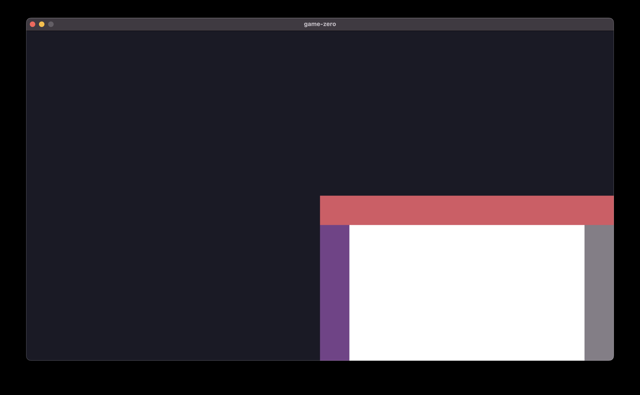
The result should look like this. If you look again at the create_debug_map
implementation and the tileset we used, you will see that the upper border
should be red, the left border purple, and the other borders gray. Due to
rendering to the logical display size, we are zoomed in enough that the
entire map does not show on the screen.
Onward
These are the messy bones of a program and shaders that will efficiently render
a tilemap. By introducing a nicer set of tiles, fleshing out the map creation
code, and organizing the SDL GPU code into a set of functions, we can create a
small tilemap rendering engine. We can extend it to render other sprites as
noted in Aside above. We can also input handling and then move the camera
across frames. If you do add input handling, try removing the added inset
term in the vertex shader and then move the map around the screen and see if
you notice any bleeding, which may look like tearing between tiles.